In-Pipeline Charts
Visualize data at any stage of your pipeline using built-in chart controllers.
Overview
nirs4all provides in-pipeline chart controllers that generate visualizations during pipeline execution. These charts help you:
Inspect data quality and distributions
Verify preprocessing effects
Monitor cross-validation fold balance
Track sample exclusions
Understand augmentation effects
Quick Reference
Category |
Keywords |
Description |
|---|---|---|
Spectra |
|
2D/3D spectral visualization |
Distribution |
|
Train/test envelope comparison |
Folds |
|
CV fold distribution |
Targets |
|
Y-value histograms |
Augmentation |
|
Augmentation effects |
Exclusion |
|
Excluded sample visualization |
Spectra Charts
Visualize spectral data with color-coded target values.
2D Spectra (chart_2d)
Displays all spectra as overlaid lines with color gradient based on y values.
pipeline = [
    "chart_2d",              # Raw spectra
    StandardNormalVariate(),
    "chart_2d",              # After preprocessing
    ShuffleSplit(n_splits=3),
    PLSRegression(n_components=10),
]
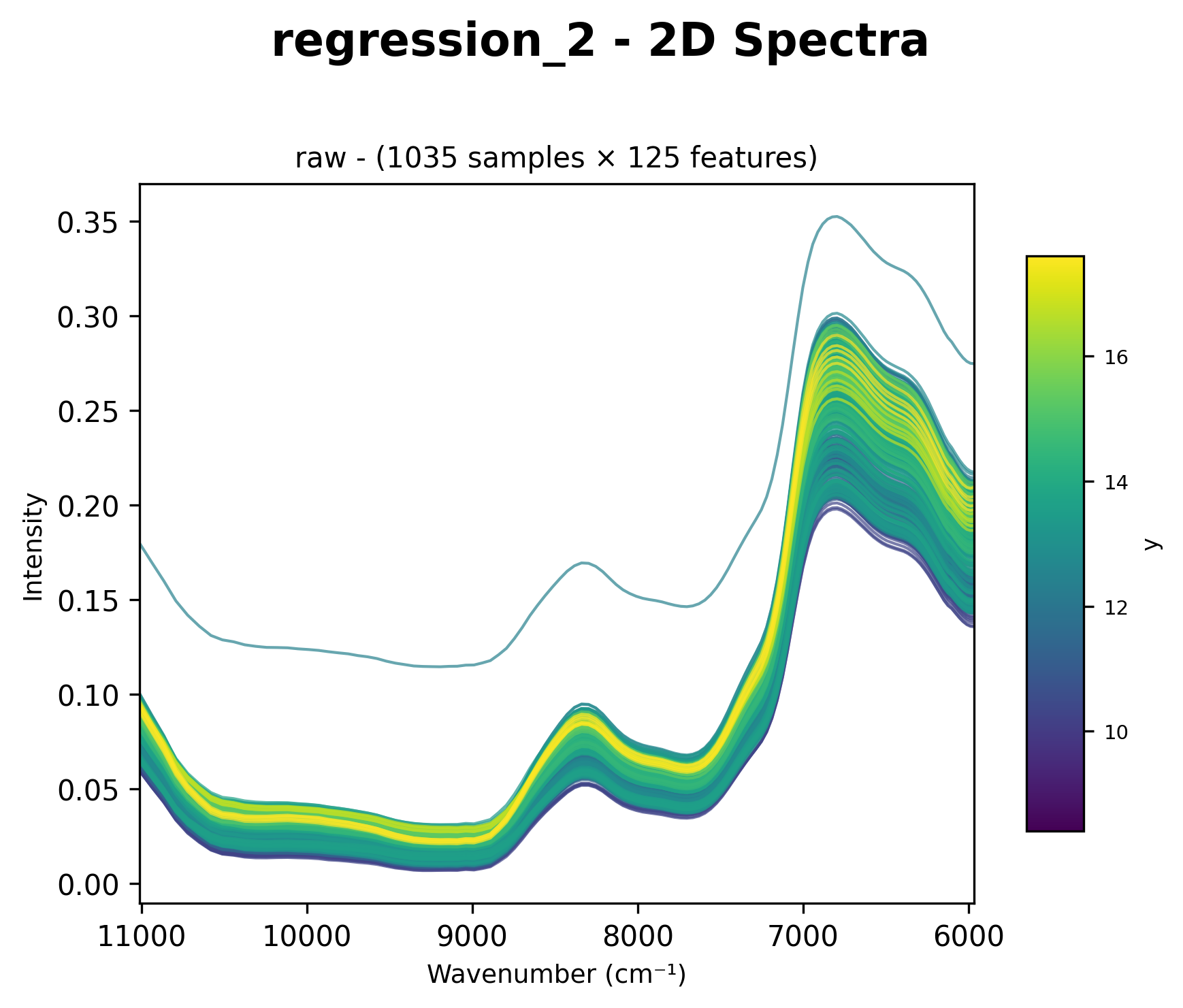
Raw spectral data with color gradient based on target values (wavenumber cm⁻¹ on x-axis).
After Multiple Preprocessing Steps
Place chart_2d after a preprocessing chain to visualize the transformed spectra:
pipeline = [
    StandardNormalVariate(),
    SavitzkyGolay(window_length=11, polyorder=2),
    FirstDerivative(),
    "chart_2d",              # Chart after all preprocessing
    ShuffleSplit(n_splits=3),
    PLSRegression(n_components=10),
]
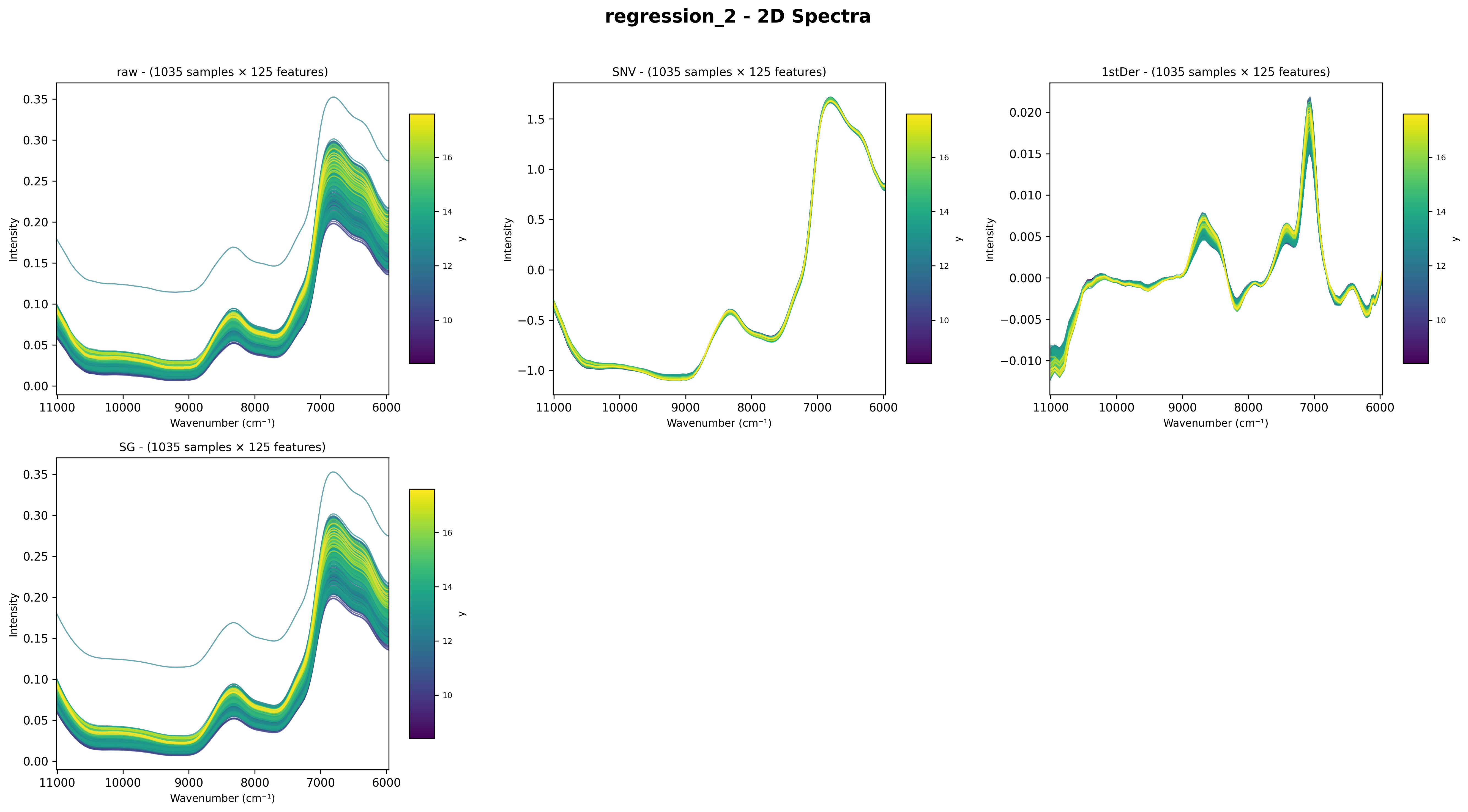
Spectra after SNV + Savitzky-Golay + First Derivative preprocessing.
3D Spectra (chart_3d)
Adds target value as Y-axis for 3D visualization.
pipeline = [
    "chart_3d",              # 3D view with target gradient
    StandardNormalVariate(),
    "chart_3d",
    ShuffleSplit(n_splits=3),
    PLSRegression(n_components=10),
]
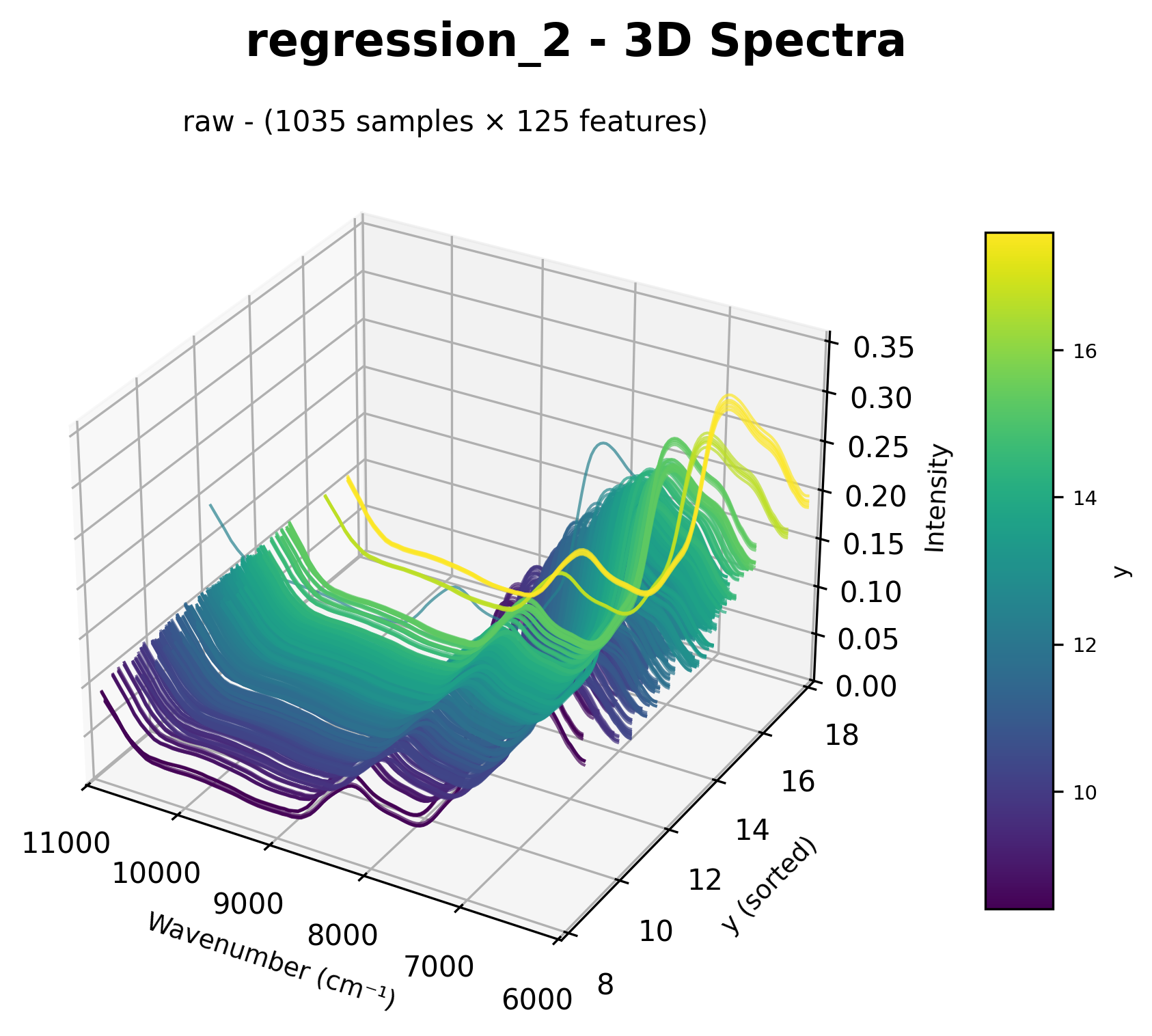
3D spectral visualization with target values as the Y-axis.
Options (Dict Syntax)
{"chart_2d": {
    "include_excluded": True,    # Include excluded samples
    "highlight_excluded": True,  # Highlight excluded with red dashed lines
}}
Spectral Distribution Charts
Show statistical envelopes comparing train vs test distributions.
Keywords
spectral_distributionspectra_distspectra_envelope
Usage
pipeline = [
    "spectral_distribution",     # Before preprocessing
    StandardNormalVariate(),
    "spectral_distribution",     # After preprocessing
    ShuffleSplit(n_splits=5),
    PLSRegression(n_components=10),
]
Output:
Shows envelope with:
Min-max range (light fill)
IQR range (25th-75th percentile, darker fill)
Mean line
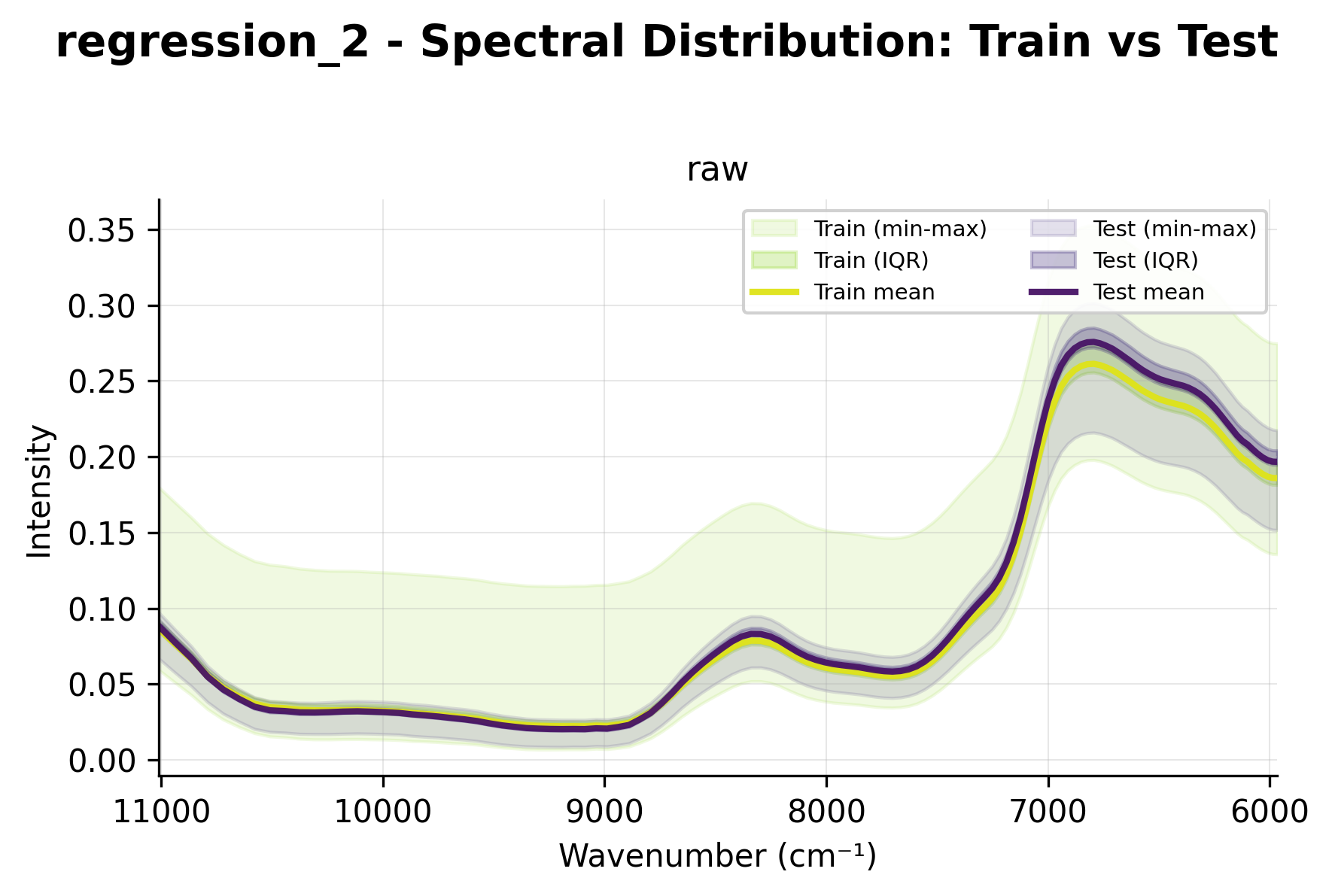
Spectral distribution showing statistical envelopes with wavenumbers on x-axis.
When CV folds exist (> 1), displays a grid with one plot per fold.
Fold Charts
Visualize cross-validation fold distributions with color-coded samples.
Keywords
Keyword |
Description |
|---|---|
|
Color by y values |
|
Color by metadata column (e.g., |
Usage
pipeline = [
    ShuffleSplit(n_splits=5, test_size=0.2),
    "fold_chart",                # Visualize fold distribution
    PLSRegression(n_components=10),
]
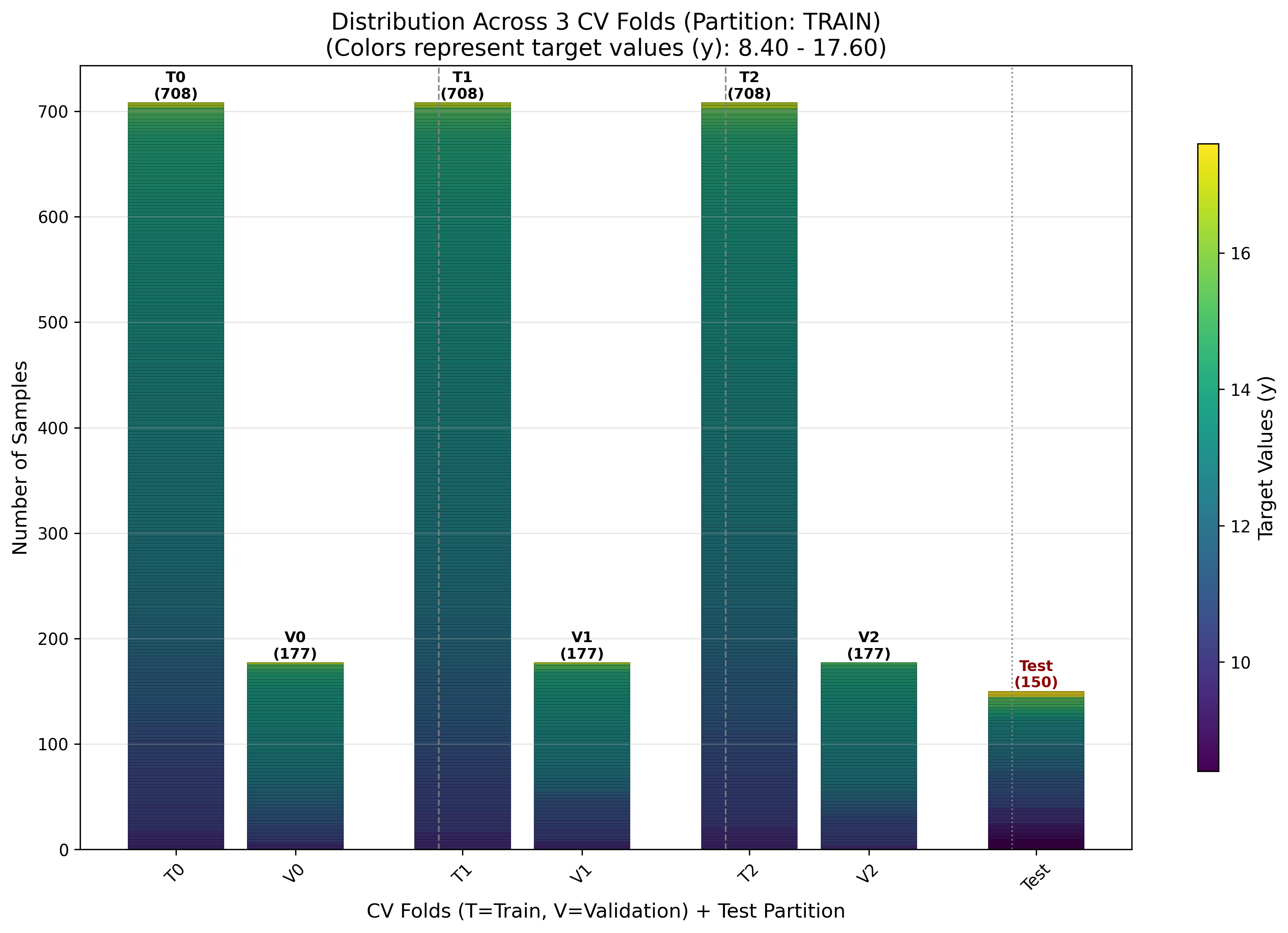
Cross-validation fold distribution with train (T) and validation (V) sets.
T: Train set for fold
V: Validation set for fold
Colors: Gradient based on y values (continuous) or discrete colors (classification)
Color by Metadata Column
pipeline = [
    ShuffleSplit(n_splits=5),
    "fold_breed",                # Color by 'breed' metadata column
    PLSRegression(n_components=10),
]
Target (Y) Charts
Visualize y-value distributions as histograms.
Keywords
y_chartchart_y
Usage
pipeline = [
    "y_chart",                   # Before splitting
    ShuffleSplit(n_splits=3, test_size=0.2),
    "y_chart",                   # After splitting (train vs test)
    PLSRegression(n_components=10),
]
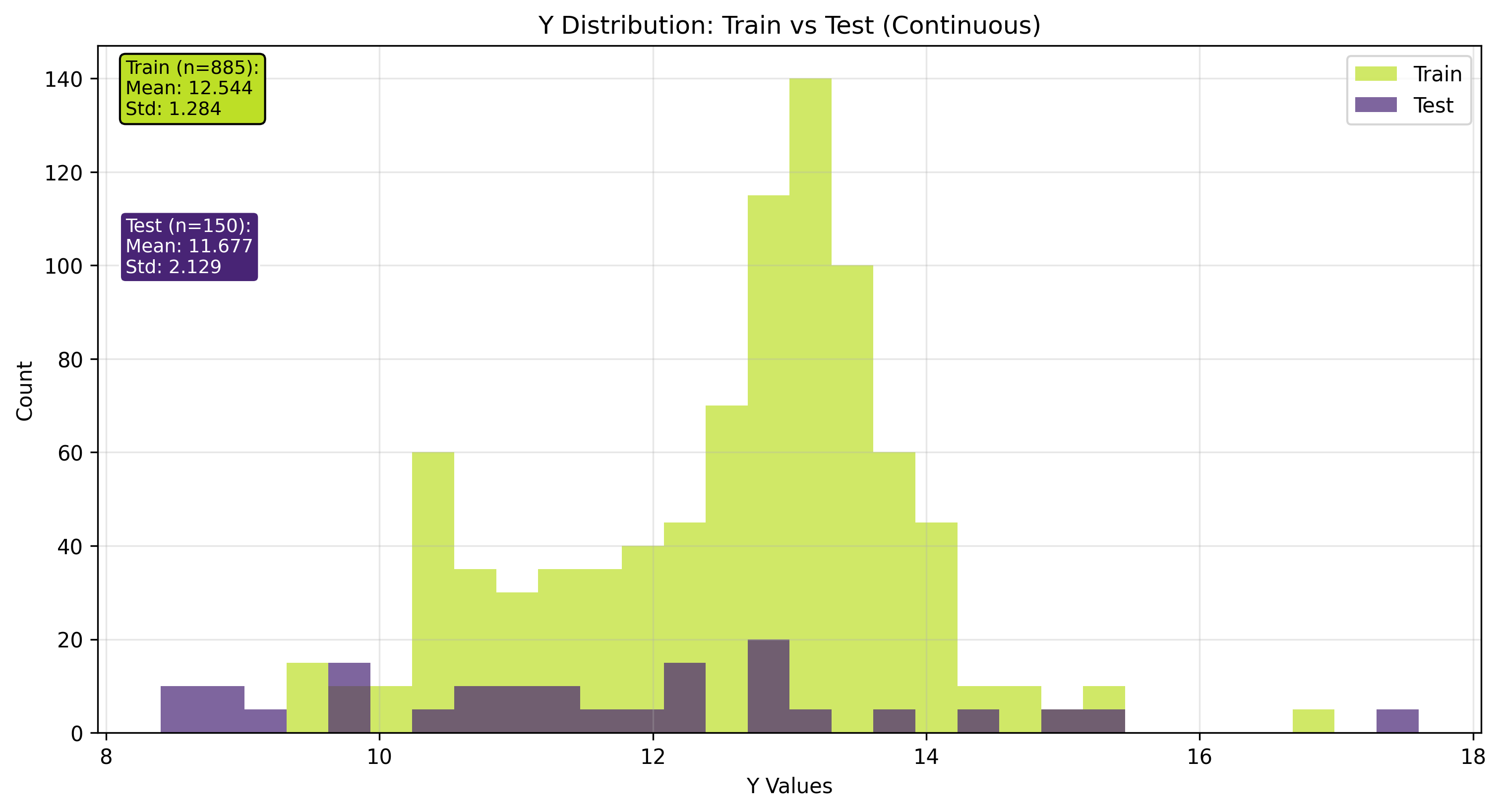
Target value (y) distribution histogram.
Options
{"y_chart": {
    "include_excluded": True,     # Include excluded samples
    "highlight_excluded": True,   # Show excluded as separate histogram
    "layout": "stacked",          # 'standard', 'stacked', or 'staggered'
}}
Layout |
Description |
|---|---|
|
Overlapping histograms (default) |
|
Bars stacked on top of each other |
|
Side-by-side bars |
CV Fold Mode
When multiple CV folds exist, displays a grid with one histogram per fold showing train vs validation distribution.
Augmentation Charts
Visualize the effects of sample augmentation.
Keywords
Keyword |
Description |
|---|---|
|
Overlay of original vs augmented |
|
Grid showing each augmentation type |
Usage
from nirs4all.operators.augmentation import GaussianNoise, SpectrumShift

pipeline = [
    {"sample_augmentation": [GaussianNoise(sigma=0.01), SpectrumShift(max_shift=5)]},
    "augment_chart",             # Overlay view
    "augment_details_chart",     # Detailed grid view
    ShuffleSplit(n_splits=3),
    PLSRegression(n_components=10),
]
Overlay Chart (augment_chart)
Shows original spectra with augmented versions overlaid:
Original samples in solid lines
Augmented samples in dashed lines with different colors
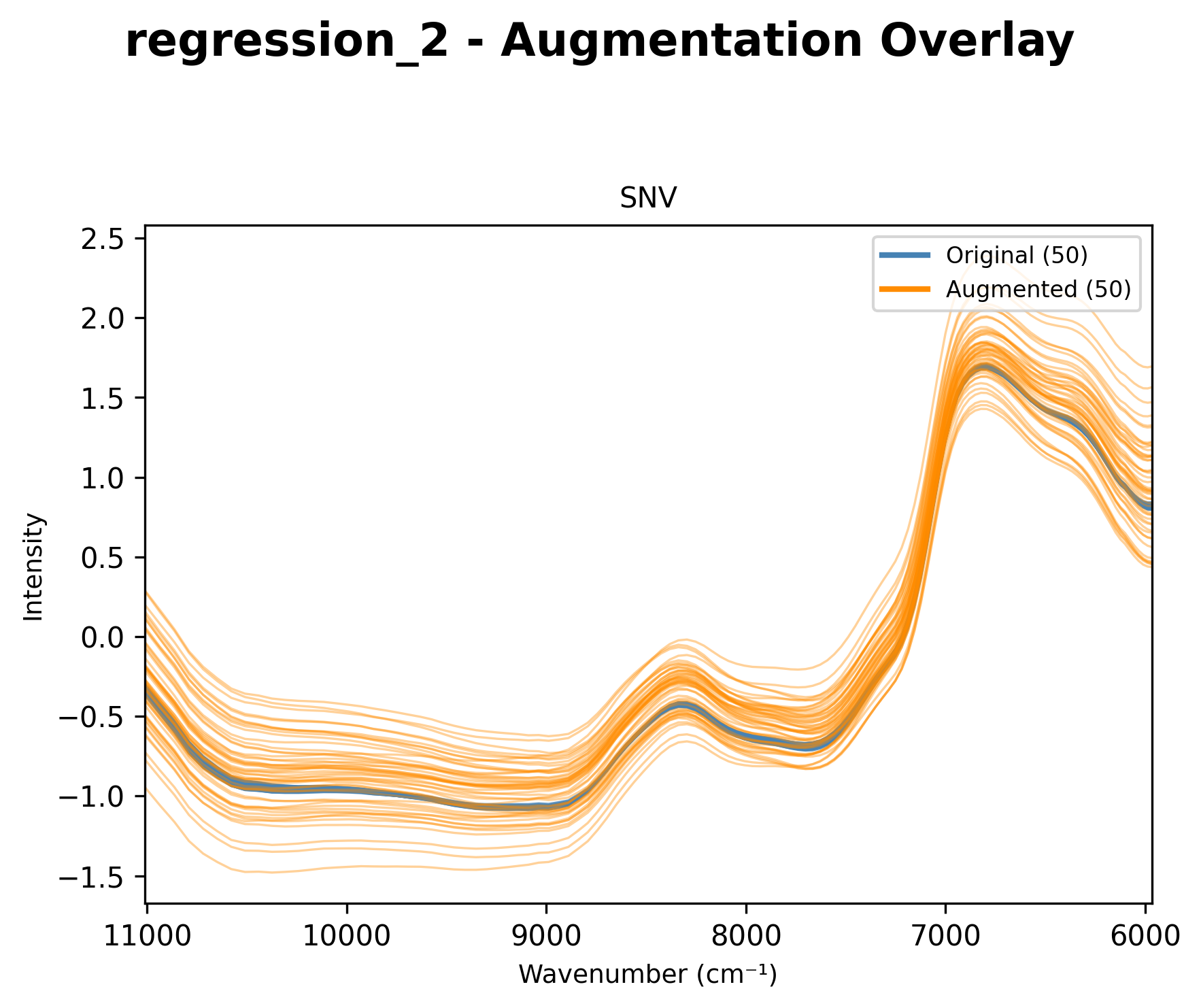
Overlay of original and augmented spectra.
Details Chart (augment_details_chart)
Shows a grid with one subplot per augmentation type:
First panel: Raw (original) spectra
Subsequent panels: Each augmentation technique separately
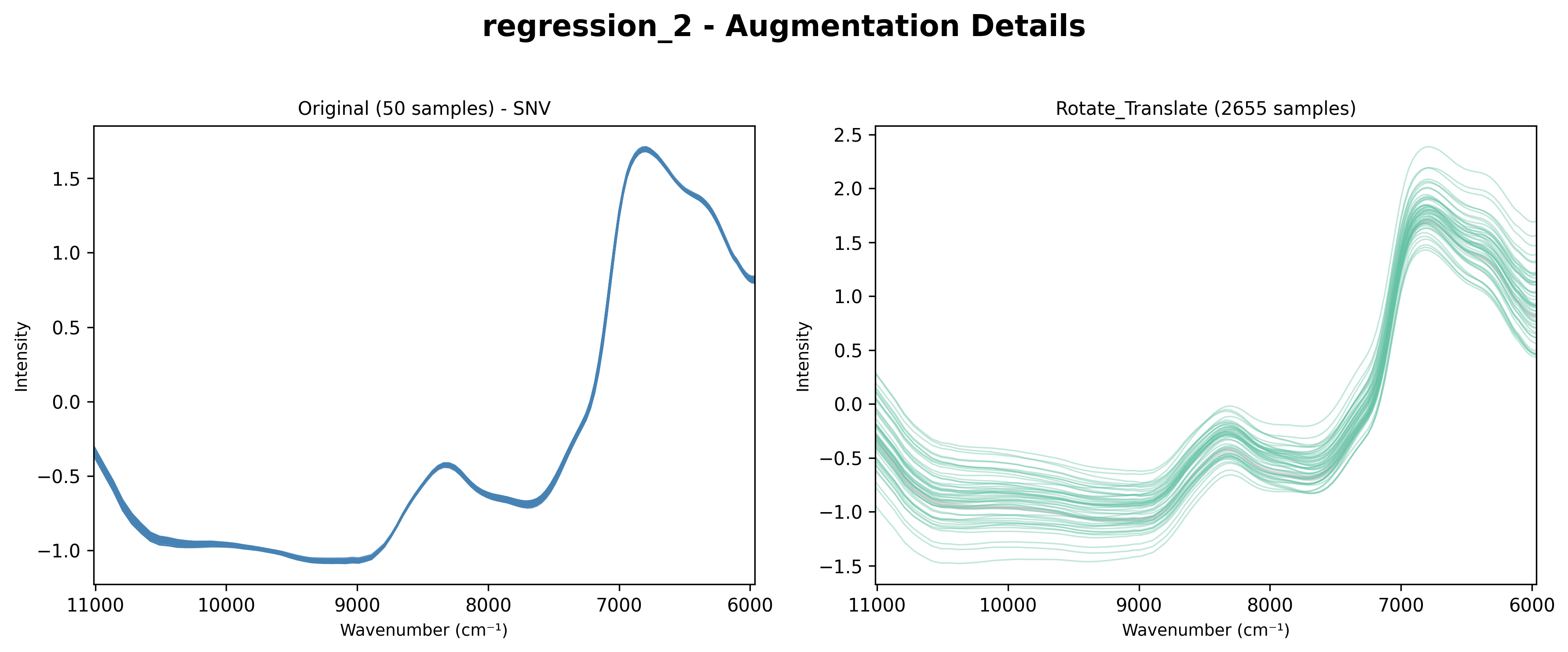
Grid showing each augmentation type separately.
Multiple Augmentation Methods
When using multiple augmentation transformers, the details chart shows each method:
from nirs4all.operators.augmentation import GaussianAdditiveNoise, WavelengthShift

pipeline = [
    {"sample_augmentation": {
        "transformers": [
            GaussianAdditiveNoise(sigma=0.003),
            WavelengthShift(shift_range=(-2, 2)),
        ],
        "count": 2,
    }},
    "augment_chart",
    "augment_details_chart",
    ShuffleSplit(n_splits=3),
    PLSRegression(n_components=10),
]
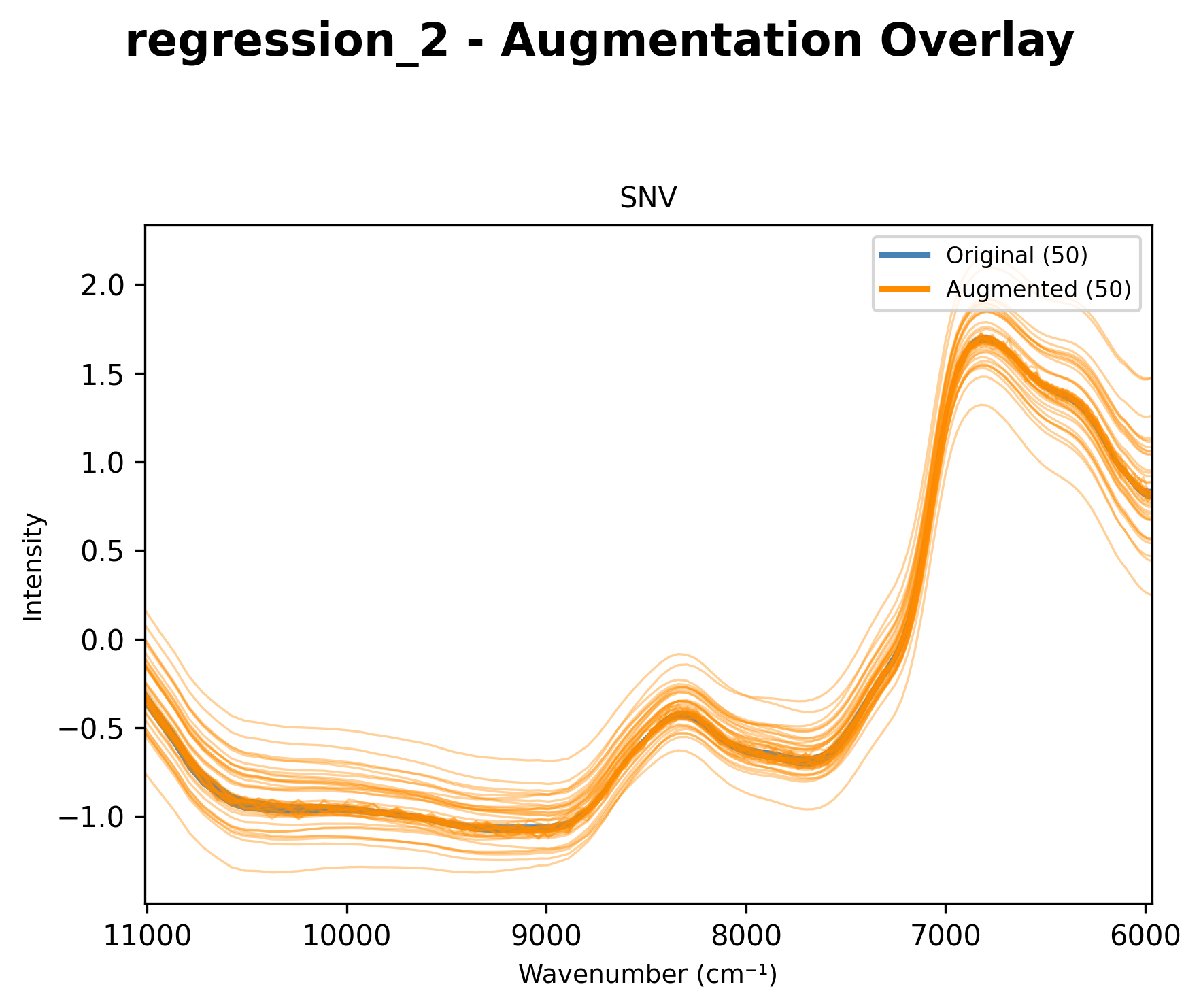
Overlay of original spectra with multiple augmentation methods applied.
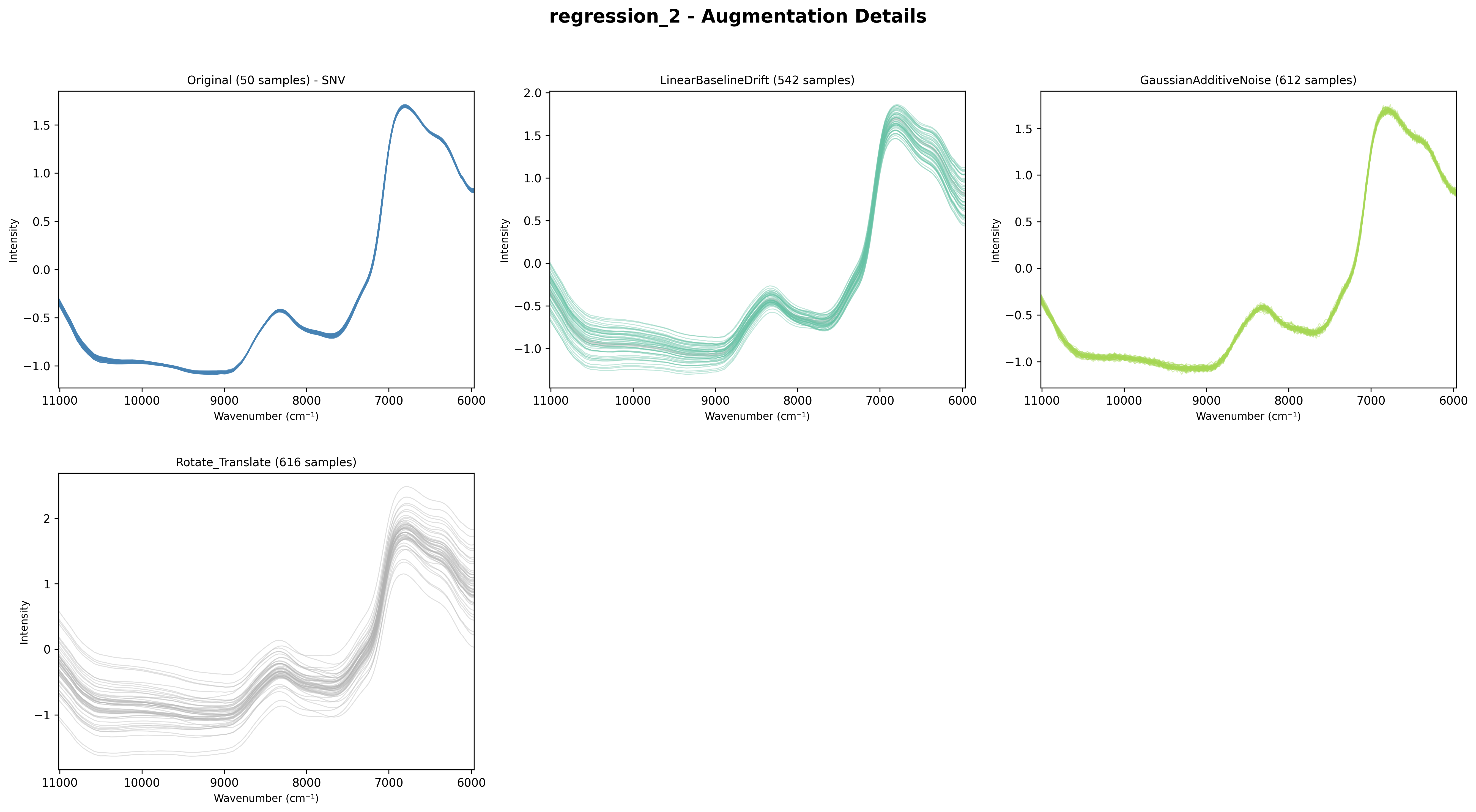
Grid showing each augmentation method (GaussianNoise and WavelengthShift) separately.
Exclusion Charts
Visualize included vs excluded samples using PCA projection.
Keywords
exclusion_chartchart_exclusion
Usage
from nirs4all.operators.transforms import OutlierExclusion

pipeline = [
    StandardNormalVariate(),
    "chart_2d",                  # Before exclusion
    {"sample_filter": {
        "filters": [XOutlierFilter(method='isolation_forest', contamination=0.1)],
    }},
    "exclusion_chart",           # Visualize exclusions
    "chart_2d",                  # After exclusion
    ShuffleSplit(n_splits=3),
    PLSRegression(n_components=10),
]
The exclusion chart uses PCA projection to show included vs excluded samples:
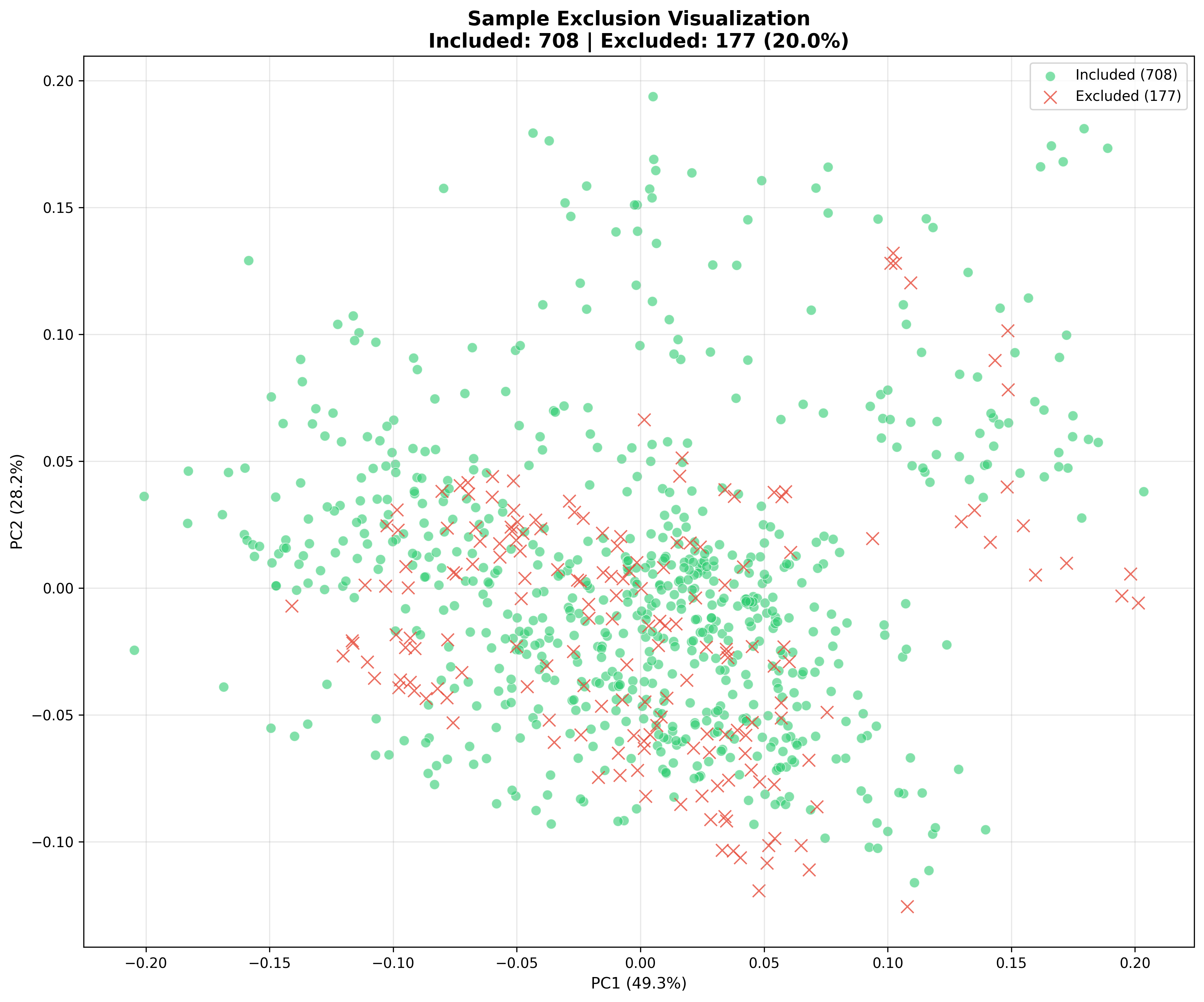
PCA projection showing included (green) vs excluded (red) samples.
Use chart_2d alongside exclusion to see the spectral view of the filtered data:
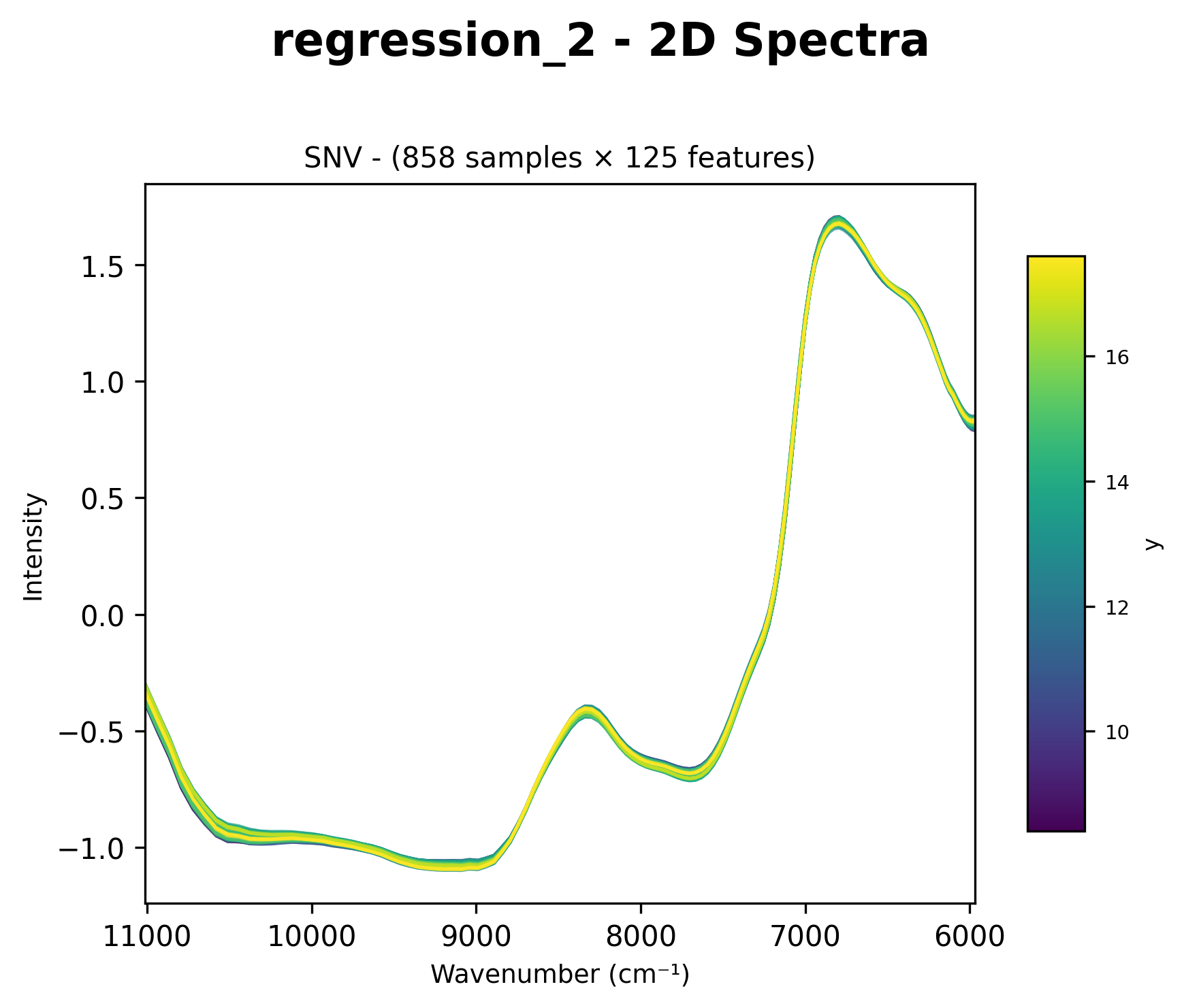
Spectral view after sample exclusion (outliers removed).
Options
{"exclusion_chart": {
    "color_by": "status",    # 'status', 'y', or 'reason'
    "n_components": 2,       # 2 or 3 for PCA dimensions
    "show_legend": True,
}}
Option |
Values |
Description |
|---|---|---|
|
|
Color by included/excluded (default) |
|
Color by target value |
|
|
Color by exclusion reason |
|
|
|
PCA dimensions for visualization |
Controlling Chart Display
Interactive Display
result = nirs4all.run(
    pipeline=pipeline,
    dataset="data/",
    plots_visible=True  # Display plots interactively
)
Save as Artifacts
Charts are automatically saved when using artifacts:
runner = PipelineRunner(
    save_artifacts=True,
    workspace_path="workspace/"
)
predictions, _ = runner.run(pipeline, dataset)
# Charts saved in: workspace/runs/<run_id>/artifacts/
Headless Mode
For automated pipelines without display:
result = nirs4all.run(
    pipeline=pipeline,
    dataset="data/",
    plots_visible=False  # Save only, don't display
)
Complete Example
import nirs4all
from sklearn.cross_decomposition import PLSRegression
from sklearn.model_selection import ShuffleSplit
from nirs4all.operators.transforms import StandardNormalVariate, FirstDerivative
from nirs4all.operators.filters import XOutlierFilter
from nirs4all.operators.transforms import GaussianAdditiveNoise

pipeline = [
    # Visualize raw data
    "chart_2d",
    "y_chart",
    "spectral_distribution",

    # Preprocessing
    StandardNormalVariate(),
    FirstDerivative(),
    "chart_2d",                  # After preprocessing

    # Outlier removal
    {"sample_filter": {
        "filters": [XOutlierFilter(method='isolation_forest', contamination=0.05)],
    }},
    "exclusion_chart",

    # Augmentation
    {"sample_augmentation": {
        "transformers": [GaussianAdditiveNoise(sigma=0.01)],
        "count": 2,
    }},
    "augment_chart",

    # Cross-validation
    ShuffleSplit(n_splits=5, test_size=0.2, random_state=42),
    "fold_chart",                # Fold distribution
    "y_chart",                   # Y distribution per fold

    # Model
    {"model": PLSRegression(n_components=10)},
]

result = nirs4all.run(
    pipeline=pipeline,
    dataset="sample_data/regression",
    plots_visible=True,
    save_artifacts=True,
)
Best Practices
Place strategically: Add charts before and after key transformations
Use sparingly in production: Charts add execution time
Check distributions: Use
spectral_distributionandy_chartto verify train/test similarityMonitor folds: Use
fold_chartto ensure balanced CV splitsTrack exclusions: Always visualize after outlier removal with
exclusion_chartSave artifacts: Enable
save_artifacts=Truefor reproducibility
See Also
Analyzer Charts Reference - Post-prediction visualization with PredictionAnalyzer
SHAP Analysis for NIRS Models - SHAP-based model explanation
Pipeline Diagram - Pipeline structure visualization
Preprocessing Overview - Preprocessing techniques